Ship to multiple addresses
Send frames to different locations in one order, completely free.
Multi-Address Shipping
Add 2 frames to your cart
to unlock this feature!


Couldn't load pickup availability
 See payment options
✦ Keep the people you love just a glance away
✦ Relive your best memories with sound on videos
✦ Invite the whole family to send pictures and videos from anywhere
✦ Preload photos so your frame is ready the moment it arrives →
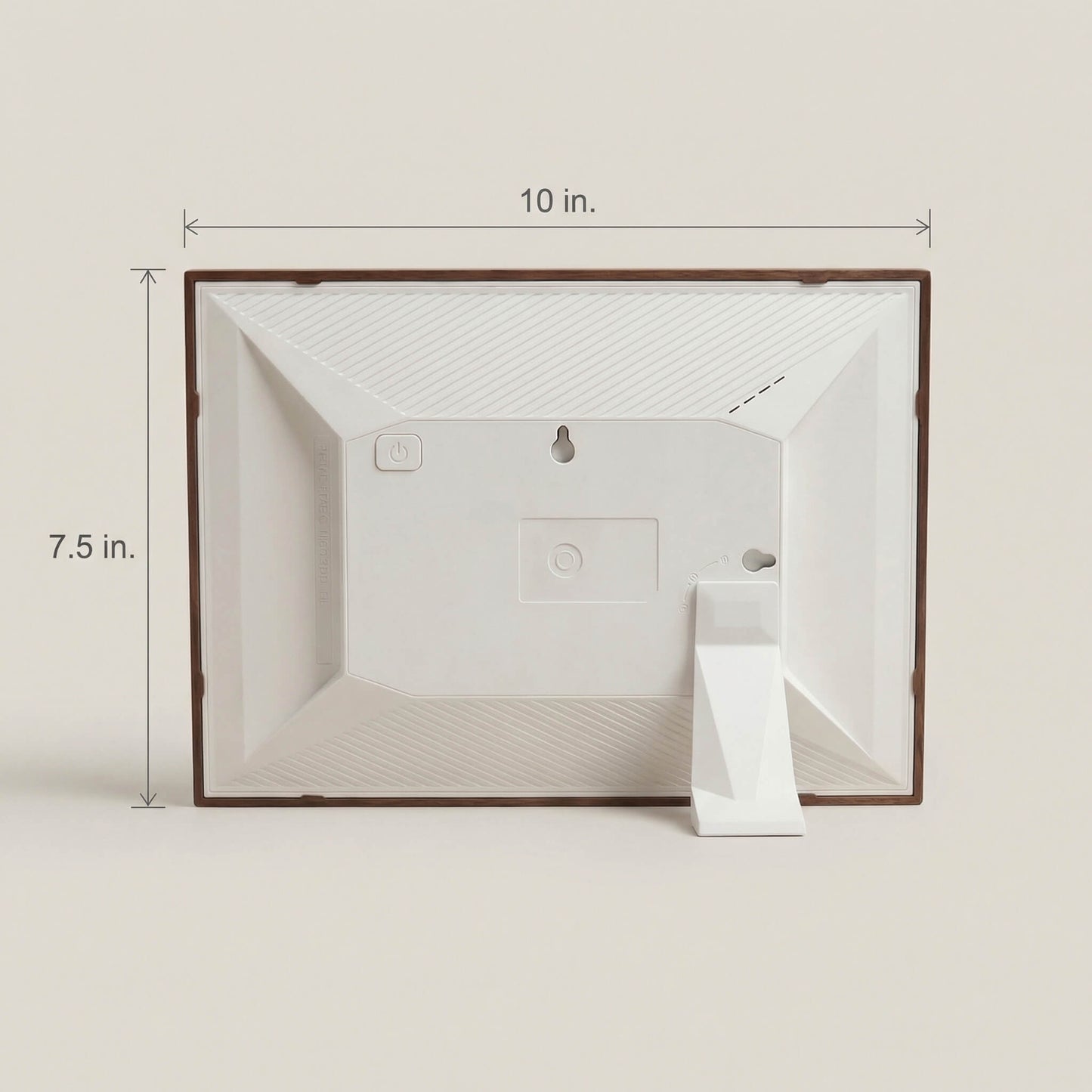
1. Power on: Press and hold the power button on the back of the frame until the screen turns on.
2. Connect: Download the free app and easily connect your frame.
3. Share: Send photos and videos instantly from your phone, no matter where you are.
✦ Display: 1280 × 800 HD (IPS Technology)
✦ Dimensions: 10" x 7.5" x 1.25"
✦ Weight: 1.24 lbs
✦ Compatibility: iOS, Android, macOS, Windows
✦ Power: Built-In 3000mAh Battery (Charged by Type-C)


Because you shouldn’t have to wait for the holidays to feel close to the people you love. Bundle 2 or more frames and instantly save.
Build Your Bundle


“The most thoughtful gift for family who lives far away.”
“It’s rare to find a product that actually delivers on an emotional promise.”
“I didn’t expect to react as emotionally as I did.”
“I had to get a frame for myself … I’m getting 3 more
for my family.”
Press and hold the power button on the back of the frame until the screen turns on.
Download the free app and connect your frame to Wi-Fi in seconds. No tech skills needed.
Send photos and videos instantly from your phone, no matter where you are in the world.

These are so amazing, we got one for everyone in the family! Love that anyone can share pictures with from all over the world.
10" Classic Frame →
My wife has completely filled her phone’s storage with photos of our children, so naturally I thought it was a great gift for her and BEHOLD, I was successful for once....
20" Black Frame →
I take way too many pictures of the kids and everything was always stuck in my camera roll. Now we actually get to see all those moments...
16” Studio Frame →
My frame works so easily, I absolutely love to look at it, and the images are so clear. Great value, especially for the price. Definitely buying another.
10" Cordless Classic Frame →
I simply love these and I have 2 in my house. I gave one to my mom and loaded it with pictures of my dad that passed away years ago. She can't stop staring at the photos.
10" Oak Frame →
I kept seeing a bunch of ads saying this would bring me closer to the people I love so I finally folded. The ads were right.
10" Cordless Mocha Frame →
Best investment ever. You can take all your photos around the house and put them in this thing for your friends and guest to see so now I have two of these.
10" Oak Frame →Family Frame seamlessly plays videos up to 2 minutes long and automatically brings Live Photos to life. These videos play sound so you can relive the laughter, the voices, and the moments that mean the most.
Note: On your frame, you can adjust video sound and live photos can be turned off.
There is no limit to how many people you can keep close. You can easily send pictures to all of your frames at once, so the people you love never have to miss a thing.
Tap the names to try it!


Tap to try it!

A picture says a thousand words, but sometimes it just needs a few more. Add a caption to any photo or video to share anything you could possibly think of.
Try typing a message above to see it appear on the frame.
We can’t always choose how a memory is captured, but every Family Frame automatically knows what to do. Whether you turn it to portrait or landscape mode, the image fills the entire screen instantly so you can focus on the people you love.
Featuring our signature cord-free design.
Explore Cordless


Think of albums like a playlist for your memories. Whether you want to only see the grandkids or relive a special day, you’re in control. You can group photos into unlimited collections and choose exactly which ones play on the frame, whenever you want.
Give the frame a unique default name (e.g., “Kitchen Frame” or “Riley's House”) so family members know exactly where they're sending memories. Once connected, everyone can easily give it their own private nickname right inside their app.

Easily adjust the on-screen text size so navigating the frame’s settings and menus is perfectly comfortable. It ensures that tweaking preferences or making changes is incredibly easy to read for whoever is using the device.

Easily invite new family members or remove users with a single tap, keeping your frame's users perfectly organized. You can also disconnect from a frame at any time using your app, which instantly syncs to the physical frame.

Easily show or hide information like captions, weather, and the sender's name. Keep the details visible to read their messages, or hide everything for a completely clean, uninterrupted picture or video.

Set specific quiet hours so the screen automatically goes dark while the house sleeps. You can also change the screen's brightness with ease.
Take complete control over how your memories appear. Whether you want to see the latest updates instantly, or let the frame surprise you with a random mix, you set the perfect rhythm for the room. Plus, you can create albums.

You can easily display the current forecast for any city in the world, giving you a beautiful, live look at the day ahead.


Decades of research from Harvard University suggests that social connection is the greatest predictor of a long, healthy life. Family Frame transforms this research into reality.
By putting the best memories and moments on a frame, your brain’s "reward system" is activated whenever you look at it, which reduces stress, improves our mood, and brings out the best in people.
Curious why this impacts us so deeply?
Read more.
Alzheimer’s does more than erase memories; it steals the unique moments that define us. We believe everyone deserves to hold onto their story and protect the memories that matter most. At the end of every month, we donate 5% of our revenue to organizations and research facilities dedicated to fighting Alzheimer’s disease.
If you would like to support the mission directly without a purchase, you can explore and donate to highly-rated Alzheimer’s research organizations here.


Whether it’s for blood relatives, your closest circle, or anyone in between, this is for the family you choose.
Family Frame is for keeping the people who matter most close and connected.
It’s a spontaneous and meaningful way to say, "I’m thinking of you."

For parents with thousands of memories trapped on their phone, this is your clutter-free gallery. For the grandparents who aren’t great with devices, this gift is magic.
A frame allows you to easily see your family's faces whenever you want to. And as more loved ones join, the frame just keeps getting better.

Most people start by giving a Family Frame to someone they love. Then they see the reaction and immediately get one for themselves.
A frame in your home means you get to see your favorite memories whenever you choose, and feel closer to the people who matter most to you.
Yes. We built Family Frame to be a shared experience so once your frame is set up, you can invite as many people as you want to send photos to it with the free app.
Every Family Frame comes with a 30-day money-back guarantee. If it's not what you expected, return it for a full refund. No hassle, no questions asked.
Yes. If you send the wrong file, you can instantly remove it from their frame right through your app, whether you sent it 3 seconds ago or 5 months ago. The person with the frame can also delete photos directly from their frame whenever they want.
Only if you want. You can easily activate Sleep Mode to set specific quiet hours for your home. The frame will automatically power down while everyone sleeps and wake back up in the morning, so you never have to worry about a bright screen keeping anyone awake.
No, not at all. The power cable is designed to be exceptionally thin and unnoticeable. It easily tucks behind a bookshelf, runs cleanly along a baseboard, and stays out of the way without turning into an eyesore. This frame specifically can be fully unplugged for up to 6 hours at a time.
Our frames are built to last, not collect dust in a drawer. But if you ever run into an issue, we offer a clear, painless replacement path with our 2-year warranty.
We keep this super easy. When a new update is available, a quick prompt will appear on the frame. You can update right then with a single tap, or choose to skip it and easily update later in the settings whenever you’re ready.
Takes less than 60 seconds.
By providing your phone number, you agree to receive marketing texts from Family Frame. Consent is not a condition of purchase. Msg & data rates may apply. Reply STOP to cancel. Privacy Policy & Terms.
Please enter a valid email address.
Free shipping. No subscriptions. 30-day returns.
Your 15% off will be applied automatically.